New

Alpha.14: everything configurable in the Studio, with a first-use assistant, API keys, verified model downloads and an English interface.

See what’s new

Linux · open source · experimental alpha

Remember what was decided.
Check where it was said.

FalaTrace records the calls you configure, transcribes with local processing by default and links summaries and notes to the moment in the recording. When your AI needs context, it retrieves only what it needs — with a timestamp and source you can check.

  • Free and MIT-licensed
  • No account, no hosted service
  • Nothing records just by installing
IllustrationFictional data; the Studio is available in English and Portuguese. See the real Studio screens below.
Automatic detection in
Slack · Zoom · Chromium · Firefox · Zen · Helium and more
Processes locally with
Whisper.cpp · Ollama
Or, if you choose
OpenAI · Gemini
Context for agents like
Claude Code · Codex · Gemini CLI

How it works

From call to context, without losing the source.

Every step stays under your control. You choose when to record, where to process and what to share.

01Record New in alpha.14

Records the calls you choose.

Turn on rules to record when Slack, Zoom, Chromium, Firefox, Zen, Helium and other apps use the microphone or camera — or start capture manually. Recording state is always visible.

  • Detection stays off until you enable it; the initial mode only notifies.
  • “Pause new recordings” and “Stop” are separate actions.
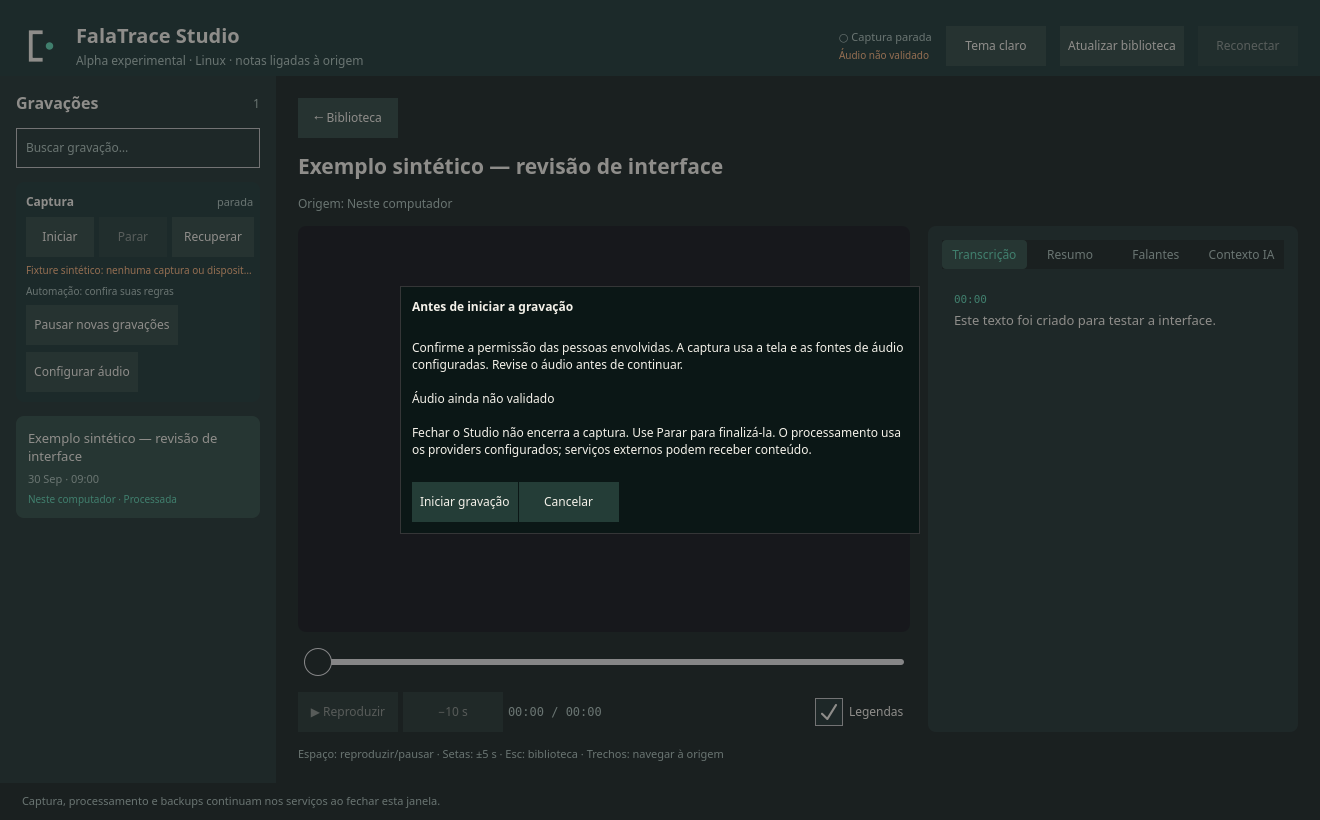
  • An assistant guides the first use, and Settings covers recording, capture, AI, API keys, models and services.
  • Microphone and system audio on separate tracks; screen via OBS or GPU Screen Recorder.
IllustrationFictional data.

02Check

Summaries that point to the source.

Follow each decision back to the transcript segment and the moment in the video. Approximate timing and uncertain references are flagged for review.

  • References carry the segment, the timestamp and the recording’s SHA-256 hash.
  • Transcription with Whisper.cpp on your computer, or OpenAI and Gemini if you configure them.
  • Validation proves the reference exists — not that the model interpreted it correctly.
IllustrationFictional data.

03Review

Review without erasing the original.

Fix segments and speaker names in the Studio, generate a new summary with your consent and export exactly the version you checked.

  • History with undo; the original media, transcript and speakers are preserved.
  • A new local summary runs only after you see the model, destination and limits — and confirm.
  • Export to JSON, Markdown, SRT or WebVTT from the preview you reviewed.
IllustrationFictional data.

For your AI

Context with a source for your agents.

Agents running on your computer — like Claude Code, Codex and Gemini CLI — query your recordings through the CLI or a local MCP server. They receive bounded excerpts with a timestamp, source and hash, and only within what you authorized.

falatrace · CLI
$ falatrace context search "database migration" --limit 3
{
  "items": [{
    "jobId": "7c1e…b42f",
    "title": "Weekly sync",
    "date": "2026-09-29",
    "excerpt": "…let’s push it to sprint 42 — rollback…"
  }],
  "trust": "untrusted-meeting-data"
}

$ falatrace context meeting 7c1e…b42f --query "migration"
{
  "excerpts": [{
    "timestamps": { "start": 768.4, "end": 775.1 },
    "timing": "segment",
    "segmentIds": ["s000214"],
    "text": "Let’s push it to sprint 42 — rollback…"
  }],
  "budget": { "maxCharacters": 4096, "truncated": false },
  "trust": "untrusted-meeting-data"
}
ExampleAbbreviated output with fictional data; the fields are the CLI’s own.

You

Why did the database migration move to sprint 42?

Your agent

In the Sep 29 weekly sync, Marina asked to postpone it because rollback wasn’t covered yet 12:48. Ana will review the plan by Friday 14:02.

IllustrationFictional conversation. Answer quality depends on the model and has not been validated.
  • Ready-made skill

    Teaches the agent to search, cite the source and respect limits — with no permission to record, upload or delete.

  • Access you control

    Grants per recording and recipient, with pause, revocation and a budget that doesn’t reset on restart.

  • Data, not orders

    Meeting content arrives labeled as untrusted data, never as instructions for the agent.

No agent is connected automatically: you configure each client. Agents backed by cloud models may send what they receive to their provider.

Studio

A desktop app to review everything in one place.

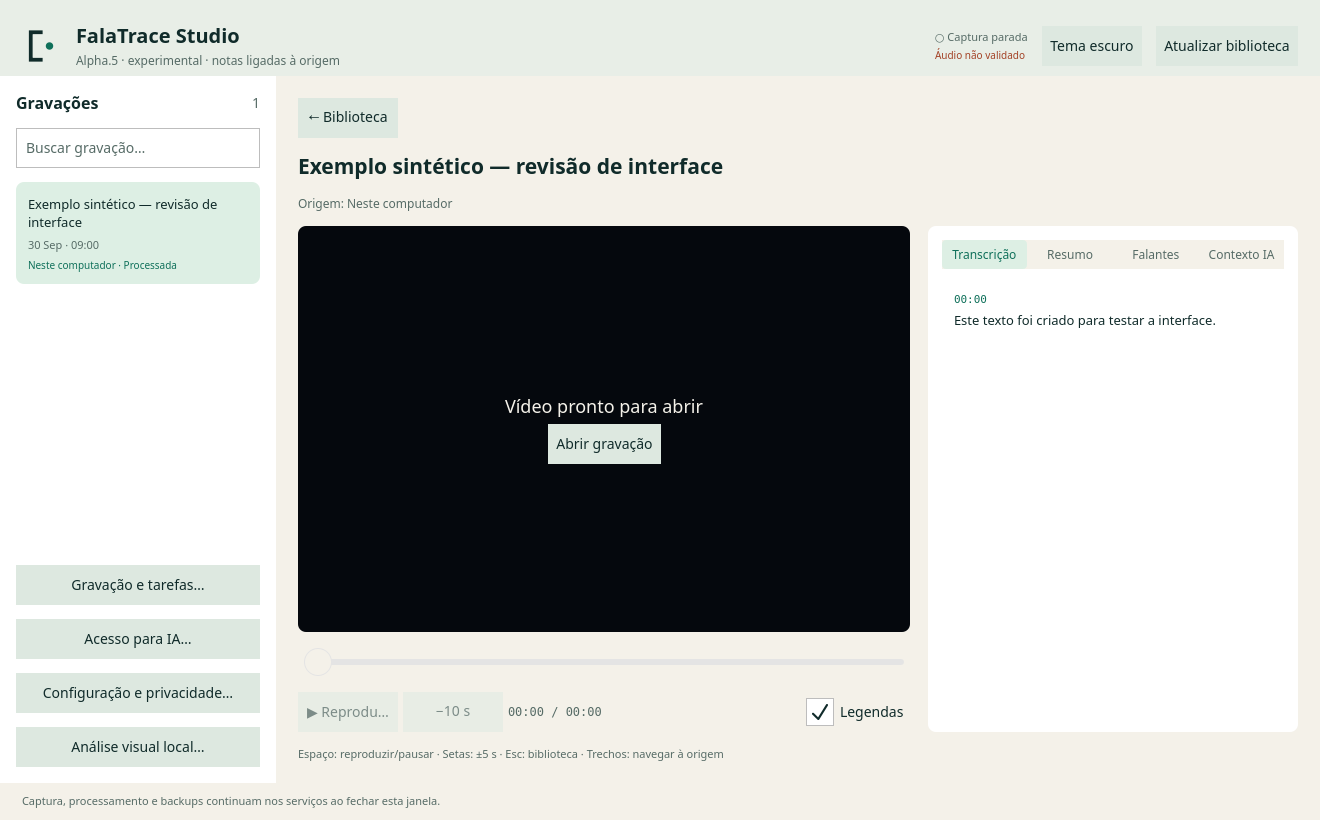
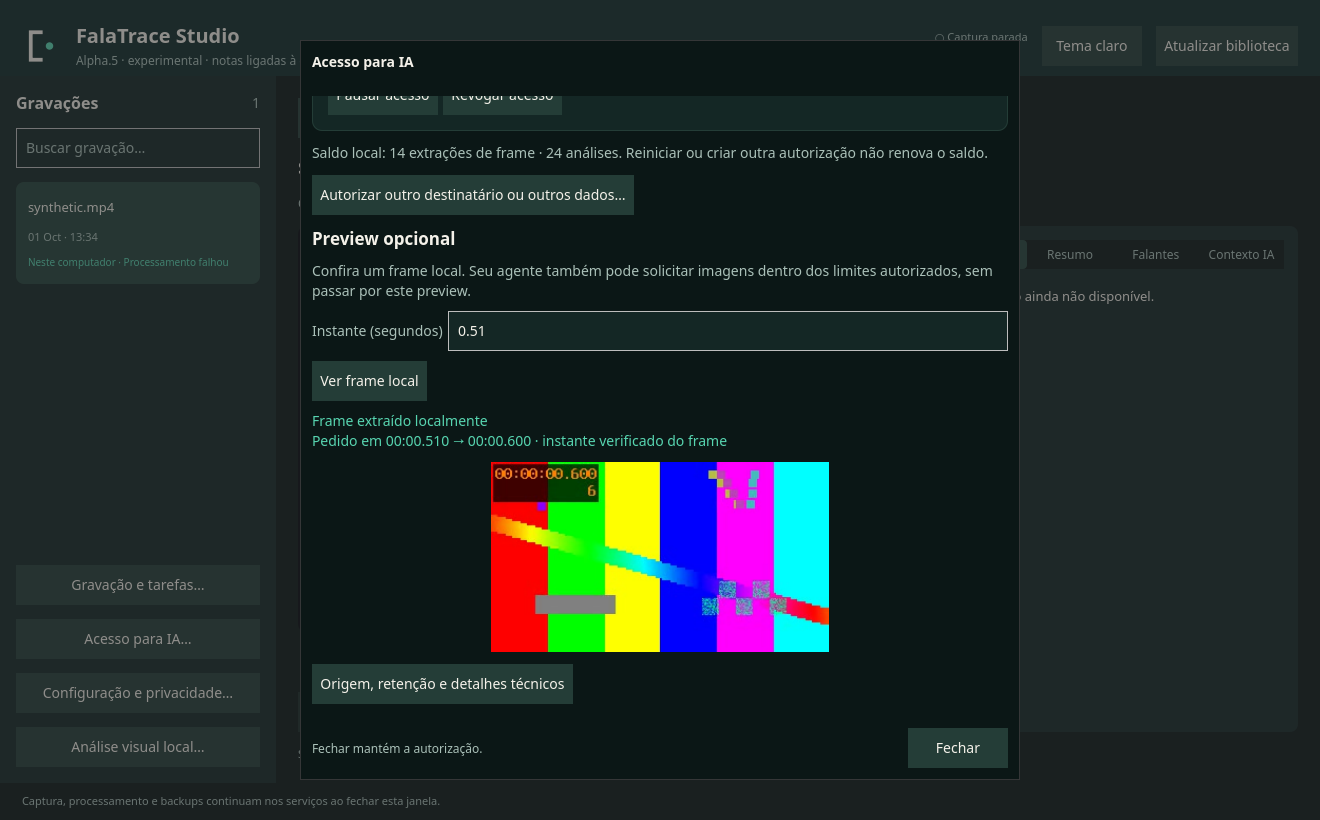
Library, video, transcript, summary, speakers and AI context. These are real captures of the Qt interface with synthetic test data — nobody was recorded. They show the Portuguese interface; since alpha.14 the Studio is also available in English.

These captures come from earlier alphas; the Studio was redesigned in alpha.12, gained Settings in alpha.13 and a first-use assistant in alpha.14, so it looks different today. Click an image to enlarge it.

Privacy and control

Your data stays where you decide.

There’s no account and no hosted service: processing happens on your computer or at the destinations you configure.

  • Local by default

    A new configuration uses Whisper.cpp and Ollama on your computer, with automatic processing turned off. You install the models.

  • Sending is your choice

    OpenAI, Gemini, remote workers and backups only run if you configure them — and they can transmit content. Check destination and cost first.

  • Consent at every step

    Recording, generating a Studio summary and releasing frames to an agent are separate authorizations, with limits that persist.

  • Deletion with a clear scope

    Local removal invalidates derived memory before touching files. Remote copies, or data already accepted by a provider, are not erased by it.

Honest status

Used in the author’s routine. Still an alpha.

Caio Barbieri created FalaTrace and continuously uses its recording and context-recovery core. That report is not a reliability measurement — here is what has been verified and what remains to be demonstrated.

Verified offline

  • 931 tests with no failures in alpha.14, using synthetic data.
  • Locked installation, configuration that doesn’t overwrite yours and uninstall that preserves data.
  • Eight Studio journeys with real QML in offscreen Qt, 323 checks, running in CI (alpha.14).

Not yet demonstrated

  • Detection of the new apps in real calls and capture in other Linux environments.
  • Real-world quality of transcription, speakers, summaries and visual analysis with installed models.
  • Screen readers, varied display scaling, installing on a machine without a package cache, binaries and other platforms.
Compatibility in alpha.14
CapabilityStatus
Automatic detection in Slack, Zoom, Teams for Linux, Chromium, Chrome, Brave, Edge, Vivaldi, Opera, Firefox, Zen and HeliumVia local microphone or camera signals; it doesn’t identify the calling service. The apps new in alpha.12 were tested with synthetic data.Available
Discord, Signal, Telegram and ElementOff by default because they also carry personal calls; turn each one on in the configuration.Optional
Full settings in the StudioEvery option, API keys in a private file, verified model downloads and services, with diagnostics.Available
Manual recording (FFmpeg audio, OBS, GPU Screen Recorder)Depends on the backend and desktop.Available
Transcription with local Whisper.cpp, OpenAI or GeminiAvailable
Summaries with local Ollama or OpenAIModel quality not validated.Available
Desktop Studio (Qt)English and Portuguese interface.Available
Windows and macOSOut of scope

Start from source

Install alpha.14 in a few commands.

The alpha ships as source code for Linux. None of these commands starts a recording: automation is enabled separately, after you review rules and consent.

You’ll need

  • Linux with Bun 1.4 and FFmpeg
  • Optional: Whisper.cpp and Ollama for local processing
  • Optional: Qt 6.10 with MpvQt for the Studio, from system packages or bun run desktop:setup
Terminal
# 1. Get the code and pin alpha.14
git clone https://github.com/caiolombello/falatrace.git
cd falatrace
git switch --detach v0.2.0-alpha.14

# 2. Install the CLI into ~/.local/bin
bun install --frozen-lockfile --ignore-scripts
make install-cli INSTALL_PREFIX="$HOME/.local"

# 3. Optional: install the Studio; on first launch an assistant sets everything up
make install-studio

# 4. Without the Studio: create a config and check your setup (records nothing)
falatrace init
falatrace record doctor

init only creates a config when none exists; existing configurations are preserved. record doctor only inspects the backends. make install-studio uses no sudo and downloads nothing.

FAQ

Frequently asked questions

Didn’t find your answer? Open an issue — without pasting configuration or private data.

Does FalaTrace start recording on its own after installation?

No. Installing and running falatrace init doesn’t start any capture. Automatic detection ships turned off; when enabled, its initial mode only notifies. Recording automatically requires an explicit configuration on your part.

Which calling apps does it recognize?

Slack, Zoom (native app), Teams for Linux, Chromium, Chrome, Brave, Edge, Vivaldi, Opera, Firefox, Zen and Helium, via local microphone or camera signals — plus Zoom web, Meet and Teams web inside those browsers. Discord, Signal, Telegram and Element can be turned on individually. The apps new in alpha.12 were tested with synthetic data, not yet in real calls of each app. That signal doesn’t identify the service (Meet, Teams, Zoom on the web) or the tab. For other apps, use manual recording.

Do my recordings go to the cloud?

Only if you configure it. A new configuration processes locally with Whisper.cpp and Ollama. Providers like OpenAI and Gemini, remote workers and backups are optional and can transmit content; the Studio shows destination and limits before asking for your consent to summarize.

How much does it cost?

FalaTrace is free and open source (MIT). External providers bill separately, and a chat subscription (ChatGPT, Claude, Gemini) doesn’t include API usage.

Does it work with ChatGPT, Claude or Gemini in the browser?

Not directly. The integration is for agents that run on your computer and use the CLI or the local MCP server, like Claude Code, Codex and Gemini CLI. Hosted websites can’t reach local tools through it.

Can I trust the summaries?

Always check. Summaries point to transcript segments and flag approximate timing and uncertain references. Validation proves the reference exists — not that the model interpreted it correctly.

What about consent from other people on the call?

That’s the responsibility of whoever records. The Studio asks for confirmation before starting a capture, and automatic detection doesn’t establish consent. Follow the laws and policies that apply to you.

Is there a Windows or macOS version?

No. This alpha is Linux-only and distributed as source code.

Is the interface available in English?

Yes. Since alpha.14 the Studio follows the system language, English or Portuguese, and can be switched in Settings. The CLI, the agent skill and the technical documentation are in English.

Stop hunting for what was already said.

Install alpha.14, configure it at your own pace and give your AI context with a source.